
By Lizza | Lizzique Media | Updated 2026
You’re great at your job, but when a homeowner searches “plumber near me” at 9 p.m. with a burst pipe, will they find you or your competitor? For plumbers, electricians, HVAC companies, cleaners, dentists, lawyers and every other business that serves customers in a specific area, local SEO is the most reliable way to turn nearby searches into phone calls and bookings.
This local SEO guide walks you through exactly what to do in 2026: how Google decides who ranks, how to set up your Google Business Profile, how to collect reviews, which pages to build, and how to measure results. Every section ends with actions you can take this week.
Key takeaway: Local SEO is not about ranking everywhere. It is about showing up when people near you search for the service you offer.
In this guide:
- What is local SEO?
- How Google ranks local businesses
- Step 1: Optimize your Google Business Profile
- Step 2: Do local keyword research
- Step 3: Build service and location pages
- Step 4: Get more Google reviews
- Step 5: Fix your citations and NAP
- Step 6: Build local links and authority
- Step 7: Get the technical basics right
- How to track local SEO results
- Common local SEO mistakes
- 30-day local SEO action plan
- FAQs
What Is Local SEO and Why Does It Matter for Service Businesses?
Local SEO is the process of optimizing your online presence so your business appears in Google search results, the Map Pack and Google Maps when people look for services in your area.
For a service business, it matters because:
- Search intent is urgent. People searching “emergency electrician” or “AC repair near me” are ready to call.
- Competition is geographic. You are not competing with the whole internet, only with businesses in your service area.
- Trust is visual. Reviews, photos and ratings show up right in the results, before anyone visits your website.
- It compounds. Unlike ads, which stop when you stop paying, a strong local presence keeps sending leads month after month.
Local SEO results appear in three main places:
- The Local Pack (Map Pack): the map with three businesses at the top of many local searches
- Google Maps: where customers browse, compare and tap “Call” or “Directions”
- Regular organic results: your website’s service and location pages
Local SEO Guide: How Google Ranks Local Businesses
Google says local results are based mainly on three factors:
| Factor | What it means | What you can do |
|---|---|---|
| Relevance | How well your profile matches what the person searched for | Choose accurate categories, list every service, use keywords naturally |
| Distance | How close your business is to the searcher or the location they typed | Set your service area correctly and keep your address accurate |
| Prominence | How well-known and trusted your business is | Earn reviews, citations, local links and mentions |
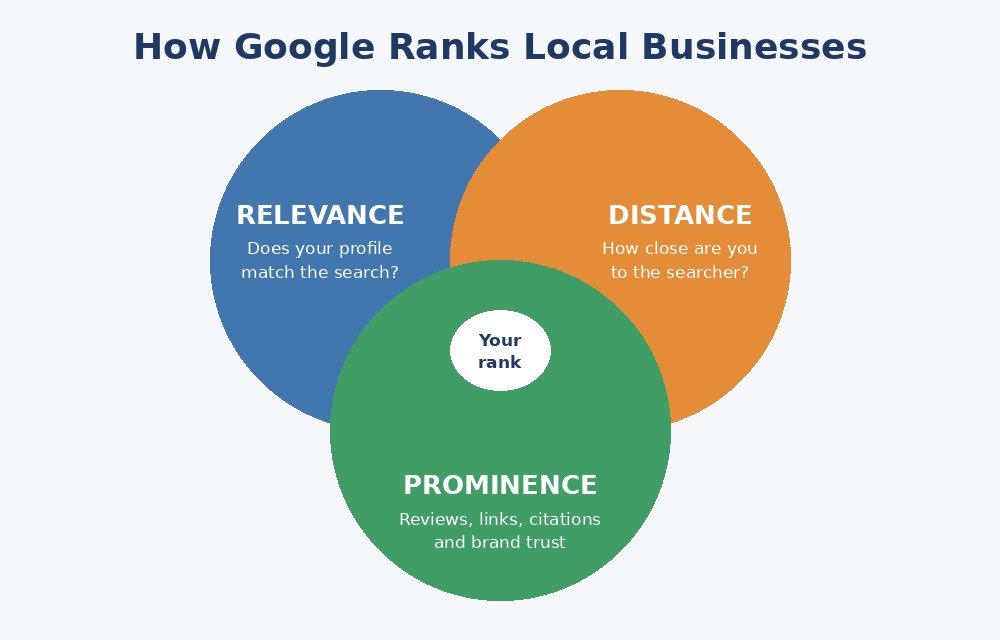
You cannot change where a customer is standing, but you can improve relevance and prominence, and that is where most of the work in this guide goes.
“Google’s own guidance on improving local ranking”.
Important: Rankings in the Map Pack change from one street to the next. A business can rank first for people two blocks away and fifth for people across town. Don’t judge your results from a single search.
Step 1: Optimize Your Google Business Profile
Your Google Business Profile (GBP) is the single biggest lever in local SEO. Treat it like a second website.
Claim and verify it
- Search for your business on Google Maps and claim the listing, or create a new one.
- Complete verification so you can edit and manage it.
- If you serve customers at their location and don’t want your address shown, set up as a service-area business and hide your address, following Google’s guidelines.
Fill in every field
- Business name: use your real name only. Adding keywords to the name violates Google’s guidelines and can get your listing suspended.
- Primary category: this is one of the strongest relevance signals. Choose the most specific one, such as “Plumber” rather than “Home service”.
- Secondary categories: add only ones that truly describe what you do.
- Services: list each service with a short description.
- Service areas: add the cities and neighborhoods you actually serve.
- Hours: keep them accurate, and update them for holidays.
- Business description: write a clear summary of what you do and where, in natural language.
- Phone and website: use a local number and link to the most relevant page.
Keep it active
- Upload real photos regularly: your team, vehicles, finished jobs, before-and-after shots.
- Publish updates and offers.
- Answer questions, and enable messaging only if you can reply quickly.
“Google’s Business Profile guidelines”.
Pro tip: Use real photos of your own work instead of stock images. They build trust faster and show Google your business is active.
Step 2: Do Local Keyword Research
Local keywords combine a service with a place or a need. Examples:
- “AC repair in [city]”
- “emergency plumber near me”
- “best electrician [neighborhood]”
- “house cleaning prices [city]”
How to find them:
- Start with your core services and your service areas.
- Type each into Google and note the autocomplete suggestions.
- Check the “People also ask” box and the related searches at the bottom of the page.
- Look at what your top competitors rank for.
- Group keywords by intent: urgent (“emergency”), research (“how much does it cost”) and comparison (“best”).
Map one main keyword to each page so your pages don’t compete with each other.
Step 3: Build Service and Location Pages
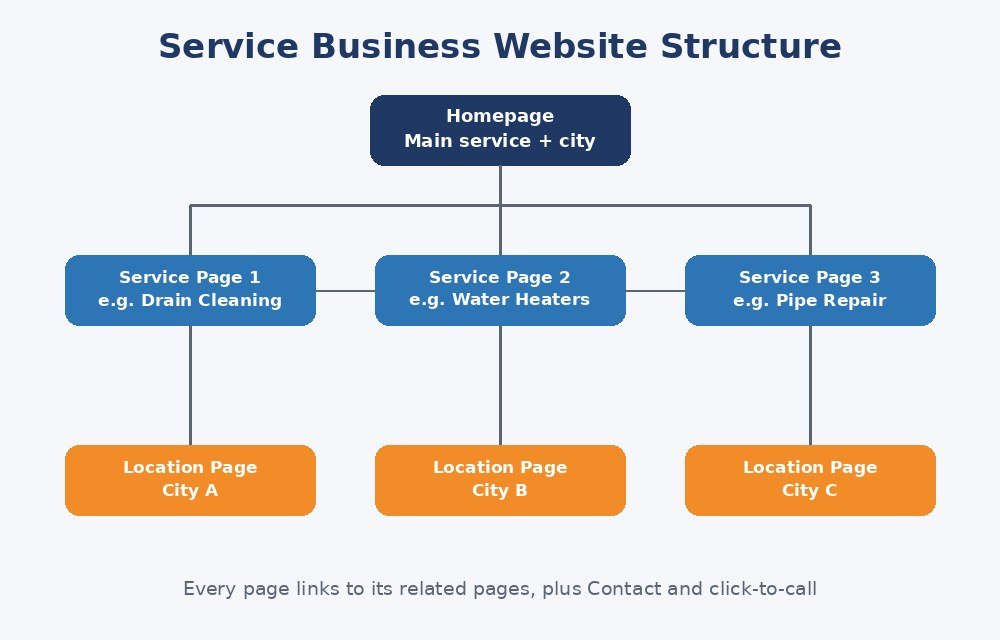
Your website tells Google what you do and where. Most service businesses need these pages:
- Homepage: your main service, your main city and a clear call to action
- One page per service: for example “Drain Cleaning”, “Water Heater Repair”, “Pipe Replacement”
- One page per service area: only if you truly serve that area and can write something useful about it
- About page: your story, team, licenses and certifications
- Contact page: phone, form, address or service area, and map
- Reviews or case studies page: proof that you deliver
What every service page should include:
- The service and location in the title, heading and first paragraph, written naturally
- What’s included, how it works and how long it takes
- Pricing guidance or what affects the price
- Photos of your work
- Customer reviews
- A clear phone number and button
- A short FAQ
Warning: Don’t copy the same page for 30 cities and just swap the city name. Google treats thin, duplicate pages as low quality, and they won’t rank. Write unique content for each location.
Step 4: Get More Google Reviews
Reviews affect both your rankings and whether someone picks you. Quantity, recency, rating and content all matter.
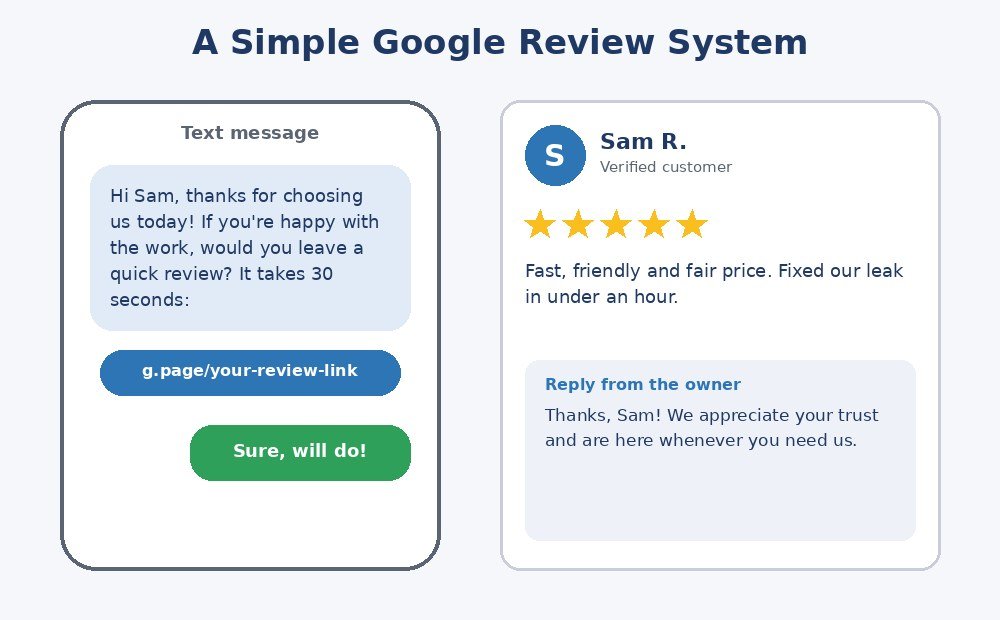
A simple review system:
- Ask at the right moment, right after the job is done and the customer is happy.
- Make it easy. Send a direct link to your review form by text or email.
- Ask every customer, not just the ones you think will say yes.
- Reply to every review, the good and the bad.
- Stay within the rules. Don’t buy reviews, offer rewards for positive ones or review-gate (asking only happy customers).
How to respond to a negative review:
- Reply calmly and quickly.
- Thank them, apologize for their experience and offer to fix it offline.
- Never argue. Remember that future customers are reading your reply, not just the reviewer.
Key takeaway: A steady stream of recent, detailed reviews beats a burst of reviews followed by silence.
Step 5: Fix Your Citations and NAP
A citation is any online mention of your business name, address and phone number, known as NAP. Directories, industry sites, social profiles and local chambers of commerce are all examples.
Why it matters: consistent details across the web help Google trust that your business is real and where you say it is.
What to do:
- Use the exact same business name, address and phone number everywhere.
- Start with the big platforms: Google, Bing, Apple Maps, Facebook and Yelp.
- Add relevant industry and local directories.
- Find and fix old listings with wrong phone numbers or addresses.
- Remove duplicate listings.
Step 6: Build Local Links and Authority
Links from trusted local sites signal prominence. Practical ways to earn them:
- Sponsor a local sports team, charity event or school program.
- Join your local chamber of commerce or trade association.
- Partner with complementary businesses, such as a realtor and a home inspector, and cross-promote.
- Get featured in local news with a useful tip or a community story.
- Publish helpful local content, like seasonal maintenance checklists for your area.
- Ask suppliers and manufacturers to list you as an installer or dealer.
Aim for relevant, local links over a large number of random ones.
Step 7: Get the Technical Basics Right
Great content can still fail if the site is slow or confusing. Check these:
- Mobile-friendly design: most local searches happen on phones.
- Fast loading: compress images and avoid heavy scripts.
- HTTPS: your site should load securely.
- Click-to-call button that stays visible on mobile.
- LocalBusiness schema markup: structured data that helps search engines understand your business details.
- Clean URLs and internal links: link your service pages to each other and to your location pages.
- Google Search Console: submit your sitemap and check for errors.
How to Track Local SEO Results
What you measure should connect to leads, not vanity numbers.
Track these:
- Calls, direction requests and website clicks from your Google Business Profile performance data
- Map and organic rankings for your main keywords, checked from different locations
- Website traffic and conversions in GA4 (form fills, calls, bookings)
- Review count, average rating and review velocity
- Cost per lead, if you also run ads
Use call tracking or tagged links so you know which channel produced each call. Check your numbers monthly and expect meaningful movement in about 3 to 6 months, sooner in low-competition areas.
Common Local SEO Mistakes to Avoid
- Keyword-stuffing the business name on Google, which risks suspension
- Inconsistent NAP across directories
- Choosing the wrong primary category
- Ignoring reviews, or never replying
- Thin or duplicate location pages
- Using stock photos only
- Not tracking calls, so you can’t tell what’s working
- A slow, hard-to-use mobile site
- Setting it up once and abandoning it. Local SEO needs regular attention.
Local SEO vs Google Ads: Which Should You Use?
They work best together:
- Local SEO builds lasting visibility and trust, and costs less per lead over time, but takes months to build.
- Google Ads and Local Services Ads bring leads quickly, but stop when you stop paying.
Many service businesses run ads to get leads now while building SEO for the long term.
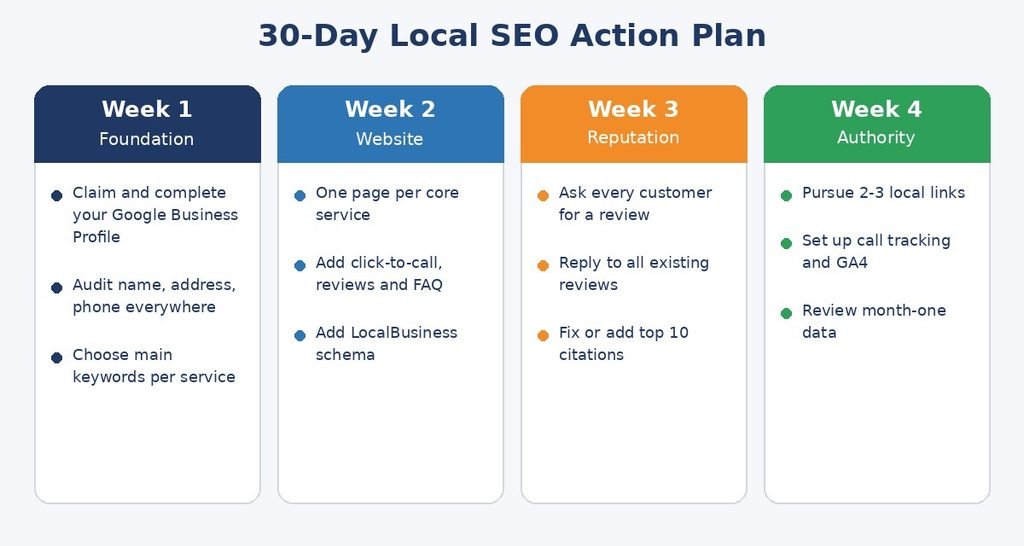
Your 30-Day Local SEO Action Plan
Week 1: Foundation
- Claim and fully complete your Google Business Profile
- Audit your name, address and phone number across the web
- Pick your main keywords for each service
Week 2: Website
- Create or improve one page per core service
- Add click-to-call, reviews and a short FAQ to each page
- Add LocalBusiness schema
Week 3: Reputation and citations
- Start asking every customer for a review
- Reply to all existing reviews
- Fix or add your top 10 citations
Week 4: Authority and tracking
- Pursue two or three local link opportunities
- Set up call tracking and GA4 conversions
- Review your first month of data and plan next steps
Frequently Asked Questions About Local SEO
What is local SEO?
Local SEO is the practice of optimizing your online presence so your business appears in local search results, Google Maps and the Map Pack when people search for services near them.
How long does local SEO take to work?
Most businesses see early movement in 2 to 3 months and stronger results in 3 to 6 months. Timing depends on your competition, your starting point and how consistently you work on it.
How much does local SEO cost?
Costs vary widely depending on your market and whether you do it yourself or hire an agency. Doing it yourself costs mainly time. Agencies typically charge a monthly retainer, so ask exactly what is included before you sign.
Do I need a website for local SEO?
You can rank in the Map Pack with only a Google Business Profile, but a website with strong service pages helps you rank for more searches and turns visitors into customers.
How do I rank higher in the Google Map Pack?
Complete your Google Business Profile, choose accurate categories, earn recent reviews, keep your NAP consistent and build local links. Relevance, distance and prominence all matter.
Are Google reviews really that important?
Yes. Reviews influence both your visibility and a customer’s decision to call you. Aim for a steady flow of genuine reviews and reply to all of them.
Can a service-area business rank without a storefront?
Yes. If you travel to customers, set up your profile as a service-area business, hide your address if you don’t serve customers there, and list the areas you cover.
Is local SEO better than Google Ads?
Neither is better for everyone. Ads give fast leads, and SEO gives lasting visibility. Many service businesses use both.
Final Thoughts
Local SEO rewards businesses that show up consistently. Complete your Google Business Profile, build helpful service pages, collect reviews, keep your details consistent and track your calls. Do those things steadily, and you will start appearing when your neighbors need you.
If you’d rather have an expert handle it, Lizzique Media helps service businesses get found locally and turn searches into customers.
Contact us for a free local SEO audit.
Read next: